

Share This Article
Last Updated: June 19, 2026
Modern students use laptops, desktops, and Chromebooks for the entire day – for homework, online courses, research, research, and notes, etc. Learning Keyboard Shortcut Keys for Students can significantly boost their productivity and lessen their time wasted searching through the menu options. Instead of picking up their mouse at regular intervals of few seconds, they can accomplish basic and frequent operations of a keyboard using just simple key press combinations.
Be it creating a document, browsing the web, having an online class, or doing online research, computer keyboard shortcut keys for students simplify the process of working and boost efficiency.
This article covers some of the most used keyboard shortcut keys and commands that every student needs to know. We’ve included statistics related to keyboard usage, shortcut issues, troubleshooting, and effective shortcuts with a few examples.
Why Students Should Learn Keyboard Shortcuts
According to many surveys and workplace productivity report shows that hotkeys limit our repetition and optimize the workplace efficiency.
Benefits of the Keyboard Shortcuts
- Save time on routine tasks
- Improve typing speed and accuracy
- Reduce dependency on the mouse
- Increase focus during study sessions
- Make multitasking easier
- Improve digital literacy skills
If you are struggling with a heavy load of tasks including assignment, project, presentations and research, a saving of few seconds at each task could accumulate up to several hours a month.
Most Important Keyboard Shortcut Keys for Students
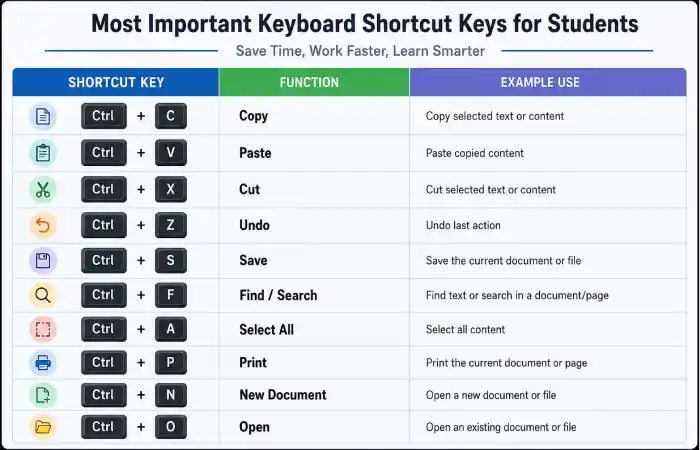
Universal Shortcuts
| Shortcut | Function |
| Ctrl + C | Copy |
| Ctrl + V | Paste |
| Ctrl + X | Cut |
| Ctrl + Z | Undo |
| Ctrl + Y | Redo |
| Ctrl + A | Select All |
| Ctrl + S | Save |
| Ctrl + P | |
| Ctrl + F | Find |
| Ctrl + N | New Document |
These are considered the most essential basic computer keys every student should know.
Windows Keyboard Shortcuts
| Shortcut | Function |
| Windows + E | Open File Explorer |
| Windows + D | Show Desktop |
| Windows + L | Lock Computer |
| Alt + Tab | Switch Applications |
| Windows + Tab | Task View |
| Windows + Shift + S | Screenshot Tool |
| Windows + Arrow Keys | Snap Windows |
| Ctrl + Shift + Esc | Task Manager |
| Windows + I | Open Settings |
| Windows + V | Clipboard History |
These shortcuts become quite beneficial especially when you are student and usually hopping around different documents and browsers and study application</b> s.
Educational Keyboard Shortcuts for Research
When investigating online, speed matters.
| Shortcut | Purpose |
| Ctrl + T | New Browser Tab |
| Ctrl + W | Close Tab |
| Ctrl + Shift + T | Reopen Closed Tab |
| Ctrl + L | Select Address Bar |
| Ctrl + R | Refresh Page |
| Ctrl + D | Bookmark Page |
| Ctrl + J | Downloads |
| Ctrl + H | Browser History |
Using these educational keyboard shortcuts helps students organize research more efficiently.
Microsoft Word Shortcuts for the Students
Many projects are created in the Word or similar document publishing supervisor.
| Shortcut | Function |
| Ctrl + B | Bold Text |
| Ctrl + I | Italic Text |
| Ctrl + U | Underline |
| Ctrl + K | Insert Hyperlink |
| Ctrl + Shift + > | Increase Font Size |
| Ctrl + Shift + < | Decrease Font Size |
| Ctrl + Enter | Page Break |
| F7 | Spell Check |
These shortcuts rationalize essay writing & project preparation.
Chrome-book Shortcut Keys
Chromebooks are gradually popular in the schools and colleges.
| Shortcut | Function |
| Ctrl + Alt +? | View All Shortcuts |
| Ctrl + Search + L | Lock Screen |
| Ctrl + Shift + Q | Sign Out |
| Alt + [ | Dock Window Left |
| Alt +] | Dock Window Right |
| Ctrl + Shift + Screenshot | Partial Screenshot |
Take Your Workflow to the Next Level Using These Commands for ChromeOS.
How the Keyboard Shortcuts Improves the Student’s Productivity
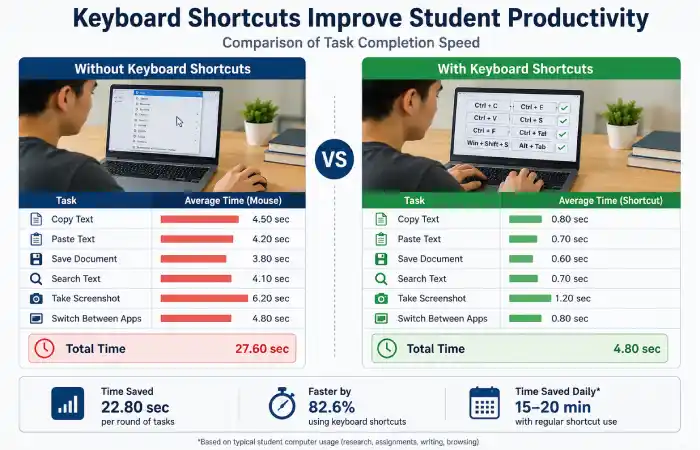
Productivity Comparison
| Task | Mouse Method | Shortcut Method |
| Copy & paste | 5 Seconds | 1 Second |
| Save Document | 3 Seconds | Instant |
| Open New Tab | 2 Seconds | Instant |
| Switch Apps | 4 Seconds | 1 Second |
| Screenshot | 10 Seconds | 2 Seconds |
Estimated Time Saved
| Daily Tasks | Time Saved |
| 50 Shortcuts Used Daily | 10–15 Minutes |
| Weekly | 1–2 Hours |
| Monthly | 4–8 Hours |
That translates into a considerable chunk of change for students who have homework and practice on their plates.
Typing Shortcuts Every Student Should Learn
Strong typing skills complement shortcut mastery.
Recommended Typing Habits
- Keep fingers on the home row keys
- Use both hands
- Avoid looking at the keyboard constantly
- Practice touch typing daily
- Learn frequently used shortcut combinations
Combining typing shortcuts with touch typing can dramatically improve computer efficiency.
Troubleshooting Keyboard Shortcuts
Sometimes shortcuts stop working.
Problem: Shortcut Not Responding
Solution:
- Restart the application
- Check keyboard functionality
- Update drivers
- Verify shortcut hasn’t been reassigned
Problem: Windows Key Disabled
Solution:
- Check gaming mode settings
- Review keyboard software configuration
Problem: Browser Shortcuts Not Working
Solution:
- Disable conflicting extensions
- Update browser version
- Reset browser settings
Best Practices for Learning Shortcut Keys
- Learn five shortcuts per week.
- Print a shortcut reference sheet.
- Practice during daily assignments.
- Use sticky notes as reminders.
- Focus on shortcuts you use frequently.
Consistency is more important than memorizing dozens of shortcuts at once.
Related Articles
To build complete computer productivity skills, read:
- Laptop Shortcut Keys List
- Basic Computer Skills for Students
- Windows Keyboard Shortcuts Guide
- Typing Speed Improvement Techniques
- Essential Productivity Tools for Students
These resources help students develop stronger digital literacy and academic efficiency.
FAQ’s
What are the most useful keyboard shortcut keys for students?
The most useful shortcuts include Ctrl+C, Ctrl+V, Ctrl+Z, Ctrl+S, Alt+Tab, Ctrl+F, and Windows+Shift+S.
How can keyboard shortcuts help students?
They save time, improve productivity, reduce repetitive actions, and help students work more efficiently.
Are keyboard shortcuts the same on all computers?
Most common shortcuts work across Windows systems, but Chromebook and Mac shortcuts may differ.
Where can students find a shortcut keys PDF?
Microsoft, computer learning Websites, colleges and universities offer pages of these hot-key lists, many available in print format, to help improve computer shortcut learning for you.
How long does it take to learn keyboard shortcuts?
Most students can memorize basic short cut keys in one or two weeks of consistent practice.
Conclusion
Using shortcuts when learning keyboard shortcuts for students is a quick and painless approach to significantly increase academic productivity. Everything from copying text, screenshotting, browsing internet tabs to applying various text formatting options to your reports or any type of documents can be simplified. Begin by utilizing simple commands every single day, slowly introduce and learn more challenging commands until soon you see an increase in overall efficiency in the digital realm and find computing to be a smoother and much easier affair.